


The Local - News in English
4.837.00 Reviews
App Specs
- Version
- 5.4.1
- Updated On
- License
- Free
- Downloads
- 50,000+
- Developer
- The Local Europe AB
- Categories
- News & Magazines
- Platform
- Android
Screenshots

 Analysis by AppCompare
When a regional news app feels difficult to use, the snag is often not the reading itself but the gap between what a reader expects and what the app is set up to show. I’d approach The Local - News in English as a focused way to follow European developments, rather than as a replacement for every source in my news routine. That distinction helps set realistic expectations from the start: its appeal is the English-language view of local issues, while the best experience depends on choosing the coverage that actually matters to you.
Start with the region you want to follow
The first useful check is whether the regional coverage matches your reason for installing the app. Someone who has moved abroad may want practical information about the country they now call home; a traveler may want context before a trip; and a reader following European politics may care about a different set of stories. Before judging the feed, I’d make sure the selected region reflects that purpose. A feed that feels irrelevant may simply be aimed at another place or interest.
That matters because English-language coverage of a country is not the same thing as a broad international newswire. The Local is most compelling when the question is, “What is happening here, and how does it affect people living here?” If I wanted a rapid overview of breaking events across the entire world, I’d pair it with a wider international outlet rather than expect one regional publication to do both jobs equally well.
Small setup checks that save time
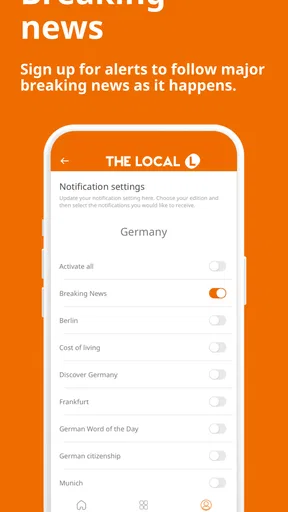
On opening any news app, I like to take a moment to check the sections and alerts before settling into a routine. In this case, choosing the region and deciding which kinds of updates deserve a notification can make the difference between a useful daily check-in and a stream that feels too broad. I’d keep alerts focused on subjects I genuinely want to follow, then use the articles themselves for slower reading. That way, a breaking notification stays a prompt to look, not a substitute for understanding the story.
If a section seems quiet or a story is hard to locate, I would try moving between the regional sections and using search before assuming the app has failed. News is organized by subject and place, so a story may sit somewhere other than the section I first expect. Saving an article for later is also a practical way to separate quick browsing from reading that deserves more attention. I find that useful when a headline raises a question I cannot answer in the moment.
Getting back into a useful reading rhythm
For a realistic everyday routine, I’d check the headlines with breakfast, open only the stories that affect my plans or understanding, and save longer pieces for a quieter break. If an alert arrives while I am working, I can decide whether it needs attention now or can wait until I have time to read beyond the headline. This is a better fit for the app than constantly refreshing it for a continuous feed of global updates.
When an article does not appear where I expect, I’d first check the selected region, browse the related subject, and search for a key term. If the issue is simply that I have lost track of a useful story, bookmarks offer a straightforward recovery path: save it when found, then return when I can concentrate. These are modest habits, but they help keep news reading deliberate instead of turning it into an endless scroll.
Worth Reading Before You Choose

EA SPORTS FC Mobile 26 Is a Bigger Football Game, but It Takes Time

Flipboard Shows What News Apps Must Do Beyond the Feed

Switching to Android Auto Means Rethinking Your Driving Routine

Google Calendar Makes a Crowded Week Easier to Manage

Ludo King Makes the Most of the Minutes Between Plans

Baby Panda World Brings Quick Play to Modern Phones, but Its Game Library Feels Busy
Getting Started with The Local
First off, downloading The Local - News in English is a breeze. Available on both Android and iOS, it's just a quick tap away from your favorite app store. Once you fire it up, the app greets you with a clean, user-friendly interface. It's all about simplicity here, folks. No clutter, no fuss—just the news you need, right at your fingertips.
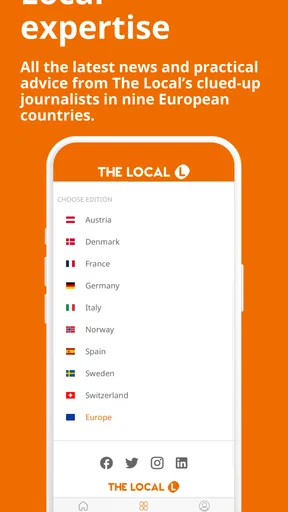
The app is designed to cater to English speakers living in various European countries or those interested in European news. Whether you're in Germany, France, or Sweden, you can select your region to get localized news in English. I found this feature particularly handy because it tailors the content to where you are or what you're interested in.
A Deep Dive into Features
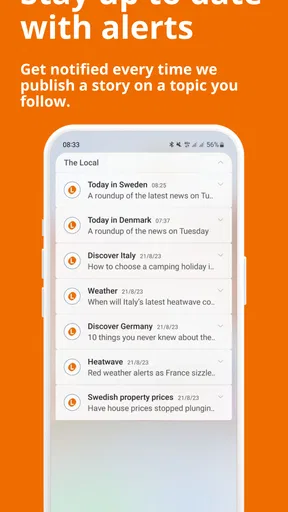
Now, let's talk about the features. The Local offers a range of sections, including politics, business, culture, and travel. Each section is well-curated, providing news that's relevant and timely. One of the standout features for me is the way the app delivers breaking news alerts. They're prompt without being intrusive—just a gentle nudge to keep you informed.
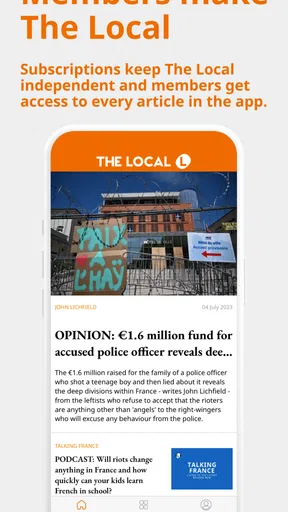
Another aspect worth mentioning is the app's focus on quality journalism. The articles are well-written, with a good balance of depth and brevity. You won't find any clickbait here, just solid reporting. And if you're a fan of in-depth analysis, The Local often features opinion pieces and editorials that offer unique insights into current events.
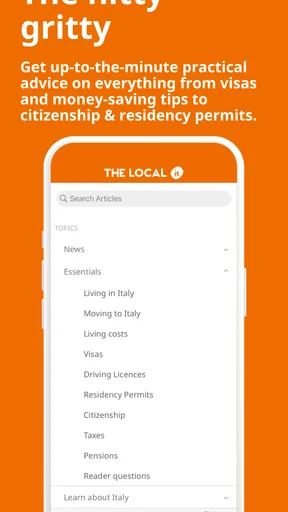
Navigation is a breeze with the app's intuitive layout. You can easily switch between different sections using the bottom menu. Plus, there's a handy search function if you're looking for something specific. The app also lets you bookmark articles you want to read later, which is a lifesaver for those of us with busy schedules.
What the reading experience suits best
The strongest use case, in my view, is not simply “keeping up with the news.” It is building a practical picture of one European country through English-language reporting. If I had recently moved, I would use the local coverage to follow political decisions and cultural conversations without needing to read another language fluently. If I were planning a visit, I’d look at travel stories alongside current affairs: the former can help with orientation, while the latter gives a better sense of the place beyond its tourist attractions.
The app can also work as a companion to a broader news habit. I might use an international publication for major events and open The Local when I want to understand how a European story is being discussed on the ground. That division of labor is more useful than comparing it with a global headline service on speed or breadth. The trade-off is clear: regional focus can give context that a general feed misses, but it does not remove the need for other sources when I want a worldwide overview.
Following practical topics without losing the news context
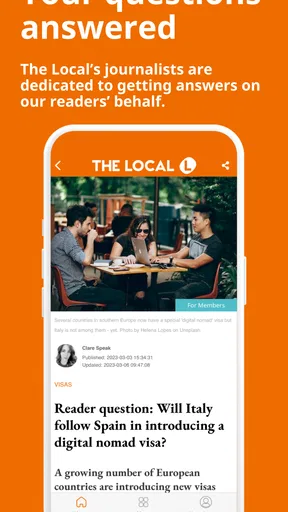
The Local’s subject range makes it relevant beyond a quick scan of politics. A person weighing a move might read about jobs, visas, citizenship, or property, then follow related political coverage to understand the public debate behind those topics. I would treat this as a way to stay oriented and discover useful reporting, not as a substitute for official instructions when making legal, financial, or immigration decisions. For those decisions, the app can help frame questions; the final details should come from the responsible authority or a qualified professional.
There is a useful reading strategy here: save the practical article, then look for the broader story around it. A piece about a policy change is easier to interpret when read alongside coverage of the political discussion or its local effects. That takes a little more effort than reading a single headline, but it helps me avoid mistaking a quick news summary for a complete guide to a consequential decision.
What to expect from the publisher and the price
The app is published by The Local Europe AB and sits in the news and magazines category. It is free to install, with in-app purchases available; the listed purchase range runs from $0.99 to $74.99 per item. I’d check the purchase details shown in the app before committing to anything, especially if I only want occasional access. The free starting point makes it easy to see whether the regional coverage fits my routine, while the presence of purchases means I would not assume every reading option is included at no cost.
Its average rating is 4.8 from around 1,500 ratings, and it has passed 50,000 installs. Those figures suggest that it has found an audience, but they do not tell me whether its particular regional focus suits my needs. It is rated for Everyone, was released on November 29, 2016, and the current version is 5.3.12, with Android 7.0 as the minimum operating system. For a reader deciding whether to try it, the more meaningful question is still whether the countries and topics they care about are represented in the app.
When a problem may be outside the app
If a story will not load or the screen seems slow, I would avoid assuming straight away that the article or app has disappeared. I’d check whether other pages load, confirm that the connection is working, and try again after reopening the app. If only one item behaves differently, returning to the relevant section or searching for its subject can help distinguish a navigation issue from a wider connection problem. These are ordinary first checks, not guarantees, but they are a sensible way to narrow down the cause.
Alerts deserve the same practical approach. If I am not seeing the updates I expect, I’d check the app’s notification settings on the device as well as the choices I made inside the app. If notifications are arriving too often, I’d narrow them rather than turn off every alert immediately; the aim is to keep the signal that helps me follow important developments without letting interruptions take over the day. And if I need a story urgently, I would open the app directly instead of relying on a notification to lead me to it.
There are also times when the app is not the right tool for the task. It is not where I would go for emergency instructions, a definitive legal answer, or a complete global news briefing. Nor would I rely on one publication alone to settle a disputed issue. Reading a report carefully, checking its date and context, and consulting a relevant official source for practical rules are habits worth keeping, whatever news app I use.
Who should choose another kind of news app
If you mainly want headlines from many continents in one fast-moving feed, a general international aggregator is likely a better first choice. If you want local reporting but read comfortably in the country’s main language, a domestic-language publication may offer a different depth and range. The Local makes the most sense for readers who value English-language access to European stories and want to follow the life of a particular place without treating language fluency as a prerequisite.
It may also be a poor fit for someone who dislikes editorial selection and wants to assemble every source manually. A curated publication gives you a coherent point of view and an easier place to begin, but it cannot represent every perspective or satisfy every specialist interest. I would use it as one lens, compare coverage when a story matters, and keep a broader source nearby for subjects beyond its regional remit.
Why You Should Give It a Go
So, why should you download The Local? Well, for starters, it's perfect for expats or anyone interested in European affairs. The app offers a unique perspective that's hard to find elsewhere. It's like having a personalized news channel that keeps you connected to the world, no matter where you are.
Moreover, The Local's commitment to delivering unbiased news is commendable. In a world where misinformation is rampant, it's refreshing to find a source you can trust. The app also encourages reader interaction with options to comment on articles or share them on social media, making it a community-driven platform.
And let's not forget the app's aesthetic appeal. The minimalist design ensures that the content takes center stage. It's easy on the eyes, and the dark mode option is a bonus for night-time reading.
Final Thoughts
In conclusion, The Local - News in English is more than just a news app—it's a bridge to understanding the world around us, especially for those living or interested in Europe. It's informative, user-friendly, and genuinely enjoyable to use. So, if you're looking to stay informed without the hassle, give The Local a try. You might just find it becoming an integral part of your daily routine.
Pros
- User-friendly interface for easy navigation.
- Real-time news updates keep you informed.
- Wide range of topics covered.
- Customizable notifications for preferred news.
- Offline reading mode available.
Cons
- Limited international news coverage.
- Occasional pop-up ads can be distracting.
- Some articles require a subscription.
- App may load slowly on older devices.
- Limited multimedia content like videos.
FAQs for The Local - News in English
What is The Local, and what type of news does it cover?
The Local is a news app that provides English-language coverage of European news. It focuses on delivering in-depth articles, breaking news, and feature stories about politics, culture, and lifestyle in various European countries. The app aims to keep expatriates and international audiences informed about local developments in an accessible manner.
Is The Local app free to use, or does it require a subscription?
The Local app offers both free and subscription-based content. While users can access a selection of articles for free, a subscription is required to unlock full access to all news stories, in-depth analyses, and exclusive features. The subscription helps support quality journalism and is available on a monthly or yearly basis.
How user-friendly is The Local app for navigating and finding news?
The Local app is designed with user experience in mind, featuring an intuitive interface that makes it easy to navigate between different sections. Users can effortlessly browse categories, search for specific topics, and customize their news feed. The app also offers push notifications to keep users updated on breaking news and important developments.
Can I customize my news feed in The Local app to focus on specific countries or topics?
Yes, The Local app allows users to personalize their news feed by selecting preferred countries and topics. This feature ensures that users receive updates and stories that are most relevant to their interests. Customization is simple and can be adjusted at any time through the app’s settings.
Does The Local app offer offline reading options?
The Local app includes an offline reading mode, enabling users to download articles and read them later without an internet connection. This feature is particularly useful for those who are on the go or in areas with limited connectivity, ensuring that users can stay informed regardless of their location.


